Law Firm CRM Guide: Connecting Leads From Ad Click to Signed Client

law firm lead tracking from ad to signed client, full UTM to CRM to intake walkthrough


A signed client is the end of a long chain. Before they sat down with your attorney, they saw your ad. Before they saw your ad, your agency bid on a keyword. Before they signed the retainer, they filled out a form, talked to your intake coordinator, scheduled a consultation, and got a callback.


At most law firms, that chain has at least three breaks. The ad system shows clicks. The CRM shows leads. The intake log shows calls. The retainer shows signed clients. Each one is correct in isolation. None of them connect to the others. So when you ask “which ad produced this client,” the honest answer is “we don’t know.”


Effective law firm lead tracking from ad to signed client is not about better ads or a better CRM. It is about connecting what you already have into one continuous chain. Here is exactly how that chain works, what each link does, and how to wire it together at your firm.


Why Law Firms Lose the Trail

Most firms have all the right tools. Google Ads. A website. A contact form. A CRM. Call tracking. An intake script. The problem is not absence. The problem is disconnection.


Each tool was bought to solve a specific problem at a specific time. The Google Ads account was set up by an agency. The CRM was chosen by a senior partner. The call tracking was added when intake complained about missed calls. The contact form came with the website redesign. Nobody designed them to work together because nobody designed them at all. They accumulated.


The result is what we call the four-island problem: ad data, web data, intake data, and case data, sitting on four islands with no bridges between them.


The Full Lead Tracking Chain

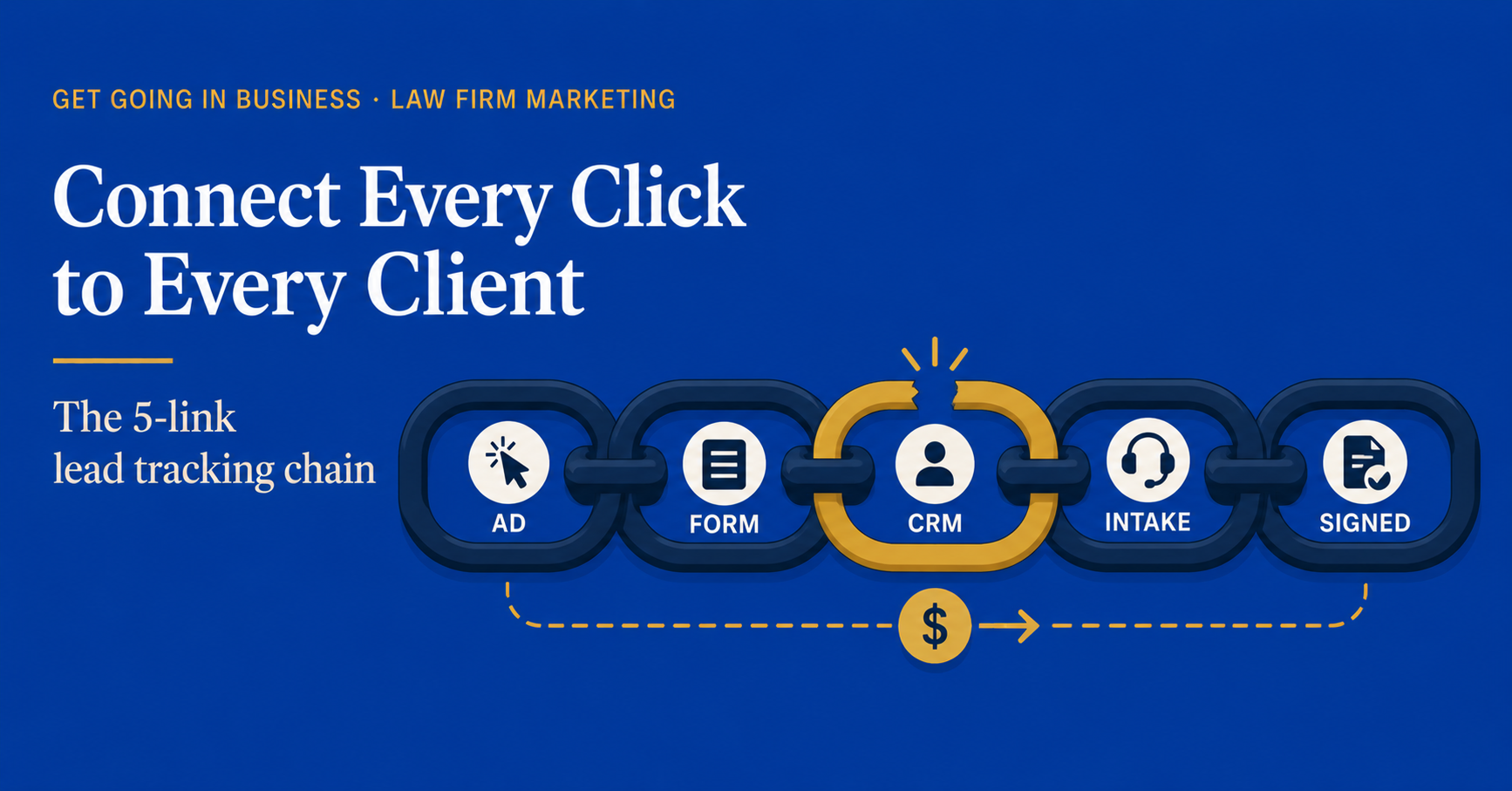
To track a single client from the first click to the signed retainer, the chain has to pass through five connected systems.


Link 1: UTM parameters on every ad

Every Google Ad, Facebook Ad, and email campaign should append UTM parameters to its destination URL. These parameters tell every downstream system where the click came from. A typical UTM looks like this:

?utm_source=google&utm_medium=cpc&utm_campaign=family-law-richmond&utm_content=headline-a


The agency should set this up. If they have not, that is your first failure point. Without UTMs, every system after this one is guessing.


Link 2: UTMs captured at the contact form

When a visitor lands on your site with UTM parameters in the URL, those parameters need to be captured by your contact form as hidden fields. The visitor never sees them. The CRM does.


Most modern form builders (Gravity Forms, Ninja Forms, WPForms, the form inside Elementor) support hidden UTM fields. If yours does not, the form needs to be reconfigured or replaced. This is a one-time fix.


Link 3: UTMs and call source flow into the CRM

When the form is submitted, the CRM creates a lead record. That record must include source fields populated from the UTM parameters. Source. Medium. Campaign. Content. Each one in its own field, never overwritten by intake.


For phone calls, the equivalent is dynamic call tracking. Each marketing channel shows a different phone number to the visitor. When the call comes in, the call tracking platform sends the call source into the CRM along with the call recording.


After this step, every lead in your CRM should have a clear source attached. If your CRM has a meaningful number of leads with source “unknown” or blank, this link is broken.


Link 4: Intake actions update the lead, not replace it

Intake answers the call or returns the form submission. They take notes. They book a consultation. None of this should create a new record. Every action updates the existing lead.


This is where most CRMs go off the rails. Intake creates a new “contact” record. The attorney’s assistant creates a separate “matter” record. The original lead, with all its source data, sits orphaned in the CRM with no connection to the case it became.


Fix: enforce that every consultation, every matter, every retainer must be linked to the original lead record. Most modern CRMs support this with a required parent-record field. Turn that requirement on.


Link 5: Signed retainer linked back to the lead

When the client signs, the retainer record gets attached to the lead. Now you have a complete chain: source > lead > consultation > matter > retainer > revenue. Pull any signed client and you can trace exactly which ad, on which day, produced them.


This is the final link. It is also the link that is broken at almost every law firm. If you cannot pull a list of signed clients from last quarter and see the source for each one, this link is your priority.


A working chain means you can ask any signed client’s record one question, “where did you come from,” and the system answers in five seconds. If the answer takes longer than that, you do not have a chain. You have a stack of disconnected logs.


Choosing the Right CRM for the Job

The CRM is the spine of the chain. Everything else passes through it. Picking the wrong CRM makes the rest of the work twice as hard.


What to look for

  • Hidden field capture on web forms
  • Native or supported integration with your call tracking platform
  • Source field that can be locked from overwrites
  • Required parent-record linking for matters and retainers
  • Reporting that segments signed clients by source

Legal-specific CRMs to consider

Clio Grow, Lawmatics, and Lead Docket are the three most common law firm intake CRMs. All three can do the chain. The question is whether yours has been configured to do it. Often it has not.


When a general CRM is enough

HubSpot, Pipedrive, and Salesforce can all handle the chain too. For firms outside personal injury and family law (where lead volume is high and intake-specific features matter), a general CRM often works just as well and costs less.


Setting Up the Chain in 5 Stages

Do not try to set up the entire chain in a single week. The mistake most firms make is over-engineering the technical setup before the team is ready to use it. Roll it out in this order.


Week 1: UTM hygiene

Make sure every ad, every email, every social post links to your site with UTM parameters. Have the agency provide a UTM convention document. Audit one week of live ads to confirm.


Week 2: Form capture

Reconfigure or replace your web forms to capture UTM hidden fields. Test by submitting your own form from a tagged link and confirming the source data hits the CRM.


Week 3: Call tracking

Install dynamic call tracking. Assign one number per channel. Confirm calls coming in are tagged with source in your call tracking dashboard, and that the source is syncing to your CRM.


Week 4: CRM field discipline

Lock the source field. Add the required parent-record link for matters and retainers. Train the intake team on the new workflow. Audit one week of new records to confirm compliance.


Week 5: Reporting

Pull the first attribution report: signed clients last 90 days, segmented by source. Compare against marketing spend. Now you have law firm marketing ROI you can actually defend.


This same five-stage build is what we walk firms through in our companion guide on tracking law firm marketing ROI, which goes deeper into the math once the tracking is in place.


Common Failures and How to Spot Them

If you suspect your chain is broken, here are the four diagnostic tests.


Test 1: The orphan lead test

Pull all leads in your CRM from the last 60 days. What percentage have a source field that is blank, “direct,” or “unknown”? If it is more than 15 percent, your UTM or call tracking link is broken.


Test 2: The orphan retainer test

Pull all signed retainers from the last 60 days. What percentage are not linked to a lead record? If it is more than 5 percent, your intake workflow is creating new records instead of updating existing ones.


Test 3: The source overwrite test

Sample 20 random lead records from the last 30 days. How many have a source that was changed after the lead came in? If more than 10 percent, your source field is not locked.


Test 4: The five-second test

Pick a random signed client from last month. Can you, in five seconds, tell what ad or channel produced them? If not, the chain is not working, regardless of what individual systems say.


Frequently Asked Questions


How much does it cost to set up the full lead tracking chain?

If you already have a modern CRM and call tracking, the setup itself is mostly configuration: 10 to 20 hours of work from a marketing operations contractor or an in-house person who knows your systems. That is $1,500 to $3,000 in setup cost. If you also need new call tracking, add $30 to $200 per month ongoing. If you need to replace your CRM, that is a bigger conversation.


Do I need a marketing agency to set this up?

Most agencies will do the ad-side UTM work as part of their retainer. The CRM-side configuration usually needs an internal owner or a separate contractor. Few agencies are equipped to configure CRM workflows; that is not their core competency.


What if my agency owns the Google Ads account?

They should give you full access. If they will not, that is a bigger problem than tracking. An agency that gatekeeps your own account is creating dependence, not value. We have covered this issue in detail in our guide on auditing law firm marketing vendors.


How often should I audit the chain once it is working?

Quarterly. Run the four diagnostic tests every 90 days. Most firms find one broken link per quarter for the first year, then maybe one a year after that, as new tools get added or staff turn over.


Get Help Building Your Lead Tracking Chain

If you read this and recognized that your chain has at least one broken link, the fix is sequential and concrete. We help law firms map the current chain, identify the breaks, and roll out the five-stage repair plan in 30 to 45 days. Most firms see better reporting in week 5 and better signed-client tracking by week 8.


Want help building a lead tracking system that doesn’t leak?


Book your free 15-min strategy call at getgoinginbusiness.com


Related: How to Track ROI on Every Marketing Dollar Your Law Firm Spends

How to Track ROI on Every Marketing Dollar Your Law Firm Spends

aw firm marketing ROI how to track, the full attribution chain in 5 numbers


Most law firms can tell you what they spent on marketing last month. Very few can tell you what they got back.


Ask a managing partner: “Of the $20,000 you spent on marketing in March, how much came back as signed retainers?” The honest answer, at most firms, is some version of “we think it’s working” or “the agency says it’s working.” Neither is a number. Neither is an answer.


Law firm marketing ROI how to track is not a tooling problem. It is a chain-of-custody problem. Every signed client started as a click, a phone call, or a referral. Between that first touch and the signed retainer, the trail has to stay intact. At most firms, the trail breaks in five specific places, and every dollar of attribution past the break is guesswork.


Here is the full attribution chain, where it breaks, and how to fix every link.


Why “ROI” Is the Wrong Word for Most Law Firms

Strictly, ROI means (Revenue – Cost) / Cost. For a law firm, that calculation has two problems.


First, revenue is delayed. A signed retainer in March might not produce billed revenue until July or later. Personal injury firms see this most acutely; a case signed today might not pay out for 18 months.


Second, attribution is messy. A signed client may have seen your ad in January, your blog post in February, asked a friend about you in March, and called you in April. Which marketing dollar gets the credit?


So when law firms talk about marketing ROI, what they usually mean and what they should measure is cost per signed client, segmented by source. That is the practical version of ROI. It is calculable, it is reliable, and it produces decisions.


The 5-Number Attribution Chain

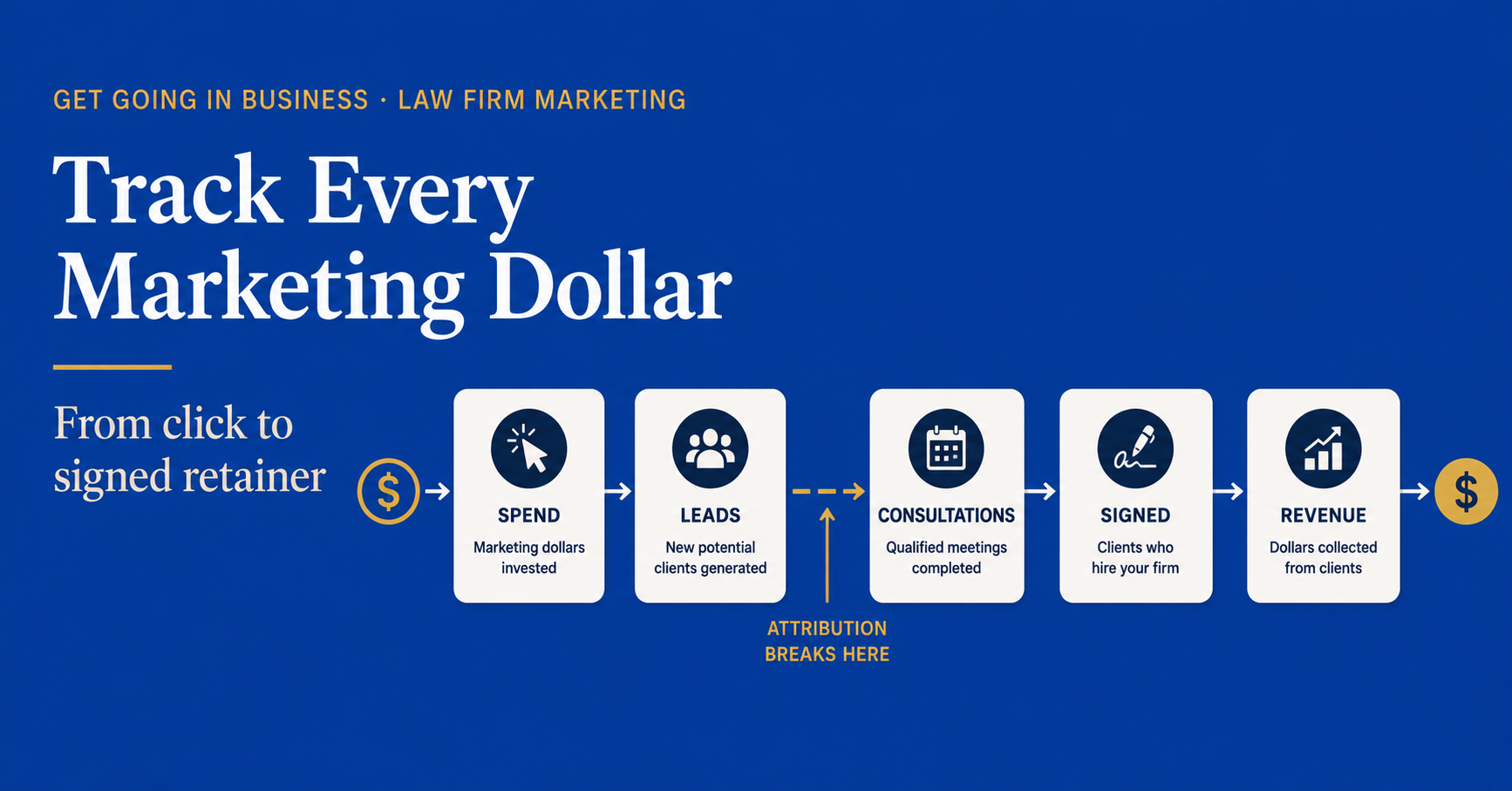
Every law firm marketing dollar passes through five stages between spend and signed retainer. To track ROI, you have to capture the number at each stage and connect them in one system.


Stage 1: Spend

How much you spent, by channel, in a given month. PPC ad spend plus agency fees. SEO retainer plus content costs. Referral program payouts. Software licenses for marketing tools. Time cost of any in-house marketing staff. Add it all up by source.


Most firms have this number. They just have it scattered across invoices, credit card statements, and the marketing manager’s head. Pull it into one spreadsheet. That is Stage 1.


Stage 2: Leads

How many qualified leads came from each source. A qualified lead is someone who reached out about a matter you handle, in your service area, in a state of need. Tire kickers, wrong jurisdiction, and out-of-scope inquiries do not count.


This is where the first major break happens. Your PPC platform counts “conversions” (form fills, click-to-calls). Your call tracking counts “calls.” Your website counts “contact form submissions.” Without source tagging, you cannot tell which leads came from which channel. UTM parameters and dedicated phone numbers fix this.


Stage 3: Consultations

How many of those leads became booked consultations. This is your intake conversion rate, but the part that matters for ROI is the source tagging staying intact. When a lead becomes a consultation in your CRM, the source field has to carry over. If it does not, every consultation looks the same and you lose the attribution thread.


Stage 4: Signed Retainers

How many consultations became signed clients. Again, the source has to follow the record. A signed client without an attached source is an unattributable win. It happened, but you cannot learn from it. Build the workflow so that no retainer can be marked “signed” in your system without a confirmed source field.


Stage 5: Case Value

What each signed client is worth. For flat-fee work, this is the fee. For contingency work, this is the expected case value (use historical averages by case type). For hourly work, this is total billings expected over the lifetime of the matter.


Once you have spend, leads, consultations, signed, and case value all tagged by source, you can calculate true ROI on every dollar.


Most law firms can track Stage 1 and Stage 5 perfectly. They lose visibility between Stages 2, 3, and 4. That is where 80 percent of the attribution problem lives.


Where the Chain Breaks (And How to Fix Each Break)

Here are the five most common attribution breaks at law firms, in order of how often we see them.


Break 1: No source tagging on inbound calls

Your PPC ad shows your firm’s main phone number. Your Google Business Profile shows the same number. Your website shows the same number. When a call comes in, intake has no idea which channel produced it. They just answer the phone.


Fix: use dynamic call tracking. Each channel gets its own number, displayed only when a visitor arrives from that channel. The intake team still answers normally, but the call recording shows source automatically. Cost: $30 to $200 per month depending on volume. ROI on this single fix is usually massive.


Break 2: UTM parameters not flowing into the CRM

Your PPC agency tags their links with UTM parameters. Those parameters get to your website. They do not get to your CRM. So when a lead fills out a contact form from a PPC click, the CRM record shows the lead but not the source.


Fix: configure your contact form to capture UTM parameters as hidden fields and pass them to your CRM. Most modern CRMs support this natively; most older ones can be wired in by a developer in 2 to 4 hours. One-time fix, permanent attribution.


Break 3: Intake team not asking “how did you hear about us”

Even with technical tracking, the question still matters. Many leads come from multiple touches: an ad click in March, a referral conversation in April. Only the lead can tell you which one tipped the decision. If your intake team is not asking, you are missing data the system cannot capture.


Fix: add the question to your intake script as a required field. Train the team to ask it conversationally early in the call, not as the last question. Track answers monthly to see how they compare against your technical tracking. Where they disagree is where you learn the most.


Break 4: Source field gets overwritten when leads convert

A lead comes in tagged “PPC.” The intake coordinator opens the record and changes the source to “Phone” because that is how they took the inquiry. The original source is gone. Every report from this point forward is wrong.


Fix: lock the original source field in your CRM. Add a separate “intake channel” field for how the conversation happened. Two different things, two different fields, neither one overwrites the other.


Break 5: Signed clients do not get tied back to original lead

This is the worst break. A consultation goes well, the client decides to sign two weeks later, and the retainer gets created as a new record in the CRM instead of attached to the original lead. The lead-to-signed chain is severed. You see the lead. You see the signed client. You cannot connect them.


Fix: enforce that every signed retainer must be linked to an existing lead record. If a signed client has no matching lead, create the lead first, mark it as “walk-in” or “referral” or whatever the actual source was, then attach the retainer. No orphan retainers.


The Tools That Make This Possible

You do not need expensive software to track law firm marketing ROI. You need software that does three things and software that does them in a connected way.


Tool 1: A CRM that captures and locks source data

Any modern legal CRM (Clio Grow, Lawmatics, Lead Docket, etc.) can do this if configured properly. The question is not which CRM, but whether someone has actually configured the source workflow correctly. At most firms, the answer is no.


Tool 2: A call tracking platform with dynamic numbers

CallRail, CallTrackingMetrics, WhatConverts. All work fine. The key feature is dynamic number insertion: each channel shows a different number to visitors so the call source is captured automatically.


Tool 3: A reporting layer that ties them together

Once spend, leads, consultations, retainers, and case value are all tagged by source, you need a single view that shows them next to each other by month. This can be a Google Sheet pulled together by hand, or it can be a dashboard built in Looker Studio. Either works. The point is one view, refreshed regularly.


If you want a deeper walkthrough of what to put in that view, see our companion guide on building a law firm marketing dashboard.


What ROI Tracking Looks Like When It Is Working

Once the chain is intact, you can answer questions like:

  • “Our PPC spend produced $X in signed cases last quarter. Is that enough?”
  • “Our SEO retainer costs $4,000 a month. It produced 3 signed clients last quarter. At $6,000 average case value, that is positive ROI. Should we increase the retainer?”
  • “40 percent of our signed clients come from referrals. We spend zero on referral cultivation. Where is the highest-leverage investment?”
  • “Our cost per signed client from PPC is $1,800. From SEO it is $450. Both are profitable. Where do we put the next $5,000 a month?”

These questions used to be impossible. They become routine once the attribution chain is solid.


How Long This Takes to Build

Realistically, a small firm with no current tracking can have all five stages connected within 30 to 45 days. The technical setup (call tracking, UTM parameters, CRM source fields) is 1 to 2 weeks of work. The behavioral setup (intake team asking the source question, source field discipline, no orphan retainers) takes 30 to 60 days of consistency.


Most firms try to fix attribution all at once and give up. The order that works: call tracking first, then UTM-to-CRM, then intake script changes, then CRM field locks, then orphan retainer cleanup. One per week. Done in 5 weeks.


Frequently Asked Questions


How accurate does law firm marketing ROI tracking need to be?

85 to 90 percent accurate is enough. Perfect attribution is impossible because some clients have many touches. The goal is not perfection. The goal is accurate enough that you can confidently shift budget between channels and see the result.


What about referrals? How do I track ROI on those?

Referrals are the highest-ROI source for most firms and also the hardest to track formally. Build a simple referral source field in your CRM with the name of the referring person or firm. Once a year, calculate average revenue per referring source. The number will surprise you.


Should I share ROI numbers with my marketing agency?

Yes, always. An agency that does not have access to your signed-client data cannot optimize against it. Sharing the numbers also tells you something: agencies that respond by changing their approach are partners. Agencies that respond by explaining why your numbers are wrong are not.


What if my CRM does not support source tracking?

Then you have a CRM problem, not a tracking problem. Any CRM purchased in the last 5 years supports it. If yours does not, the cost of switching is almost certainly less than the cost of running blind on attribution.


Get Help Building Your Attribution Chain

If you read this and recognized at least one break in your own chain, you are normal. Most firms have at least three. The fix is sequential and concrete, and we have walked dozens of firms through it. We can map your current chain, identify the breaks, and give you a 30-day plan to close them.


Want help tracking marketing ROI from ad click to signed retainer?


Book your free 15-min strategy call at getgoinginbusiness.com


Related: How to Build a Law Firm Marketing Dashboard That Actually Makes Sense